
How Plans, Devices and Billing Work
SmartEngage keeps its billing simple, but three points are worth understanding before you pay: how the free trial starts, what a device means, and which charges come from SmartEngage and which come from Meta. This guide walks through each one and shows where to find it all on the Plan & Billing page.
SmartEngage
Most billing questions we hear come down to the same few misunderstandings. Someone buys extra devices expecting extra WhatsApp numbers. Someone expects their SmartEngage plan to cover Meta's message charges. Someone waits for an automatic renewal that never comes.
None of these should happen to you. Here is how it all fits together.
New to SmartEngage? Start with What SmartEngage Is and How It Works.
Two Separate Bills: SmartEngage and Meta
Sending WhatsApp messages as a business involves two companies, and each charges for its own part:
- SmartEngage charges for the software: your plan and any extra devices. You pay this on the Plan & Billing page.
- Meta charges for the WhatsApp messages themselves, at its official rates. You pay this directly to Meta, through the payment method on your WhatsApp Business Account.
SmartEngage is an Official Facebook Tech Provider and adds no markup to Meta's message fees. Every SmartEngage invoice says so too: official WhatsApp message charges are billed separately by Meta.
If you have not set up Meta's side yet, read How to Add a Payment Method for WhatsApp.
The Free Trial
Every new account starts with a free trial. It does not begin when you sign up. It begins when you connect your WhatsApp number, so none of it is used up while you wait for Meta to approve your account.
Until then, the Plan & Billing page shows Your Free Trial Has Not Started Yet, with a Connect WhatsApp button. Once it is running, the page shows when the trial ends and how many days are left.
The trial has allowances on the number of campaigns you can send and on how many people those campaigns can reach, and it includes one active device. Extra devices cannot be added during the trial.
Paid Plans: Monthly or Yearly
After the trial there is one plan with everything included, and you choose how often you pay for it: Monthly or Yearly. The features are the same either way. Yearly works out cheaper over a full year.
Paid plans include unlimited contacts and unlimited campaigns, subject to fair-use limits and WhatsApp's own restrictions, along with the inbox, campaign scheduling, templates, contact management and analytics. Each plan includes one active device.
A plan runs for the period you paid for. It does not renew automatically, and nothing is charged unless you choose to pay. The Plan & Billing page shows Active Until with the date, and in the last two weeks it reminds you to pay again. Paying before the end adds a new period after the current one, so you never lose days you have already paid for.
Current prices, the trial length and its allowances are on our pricing page.
What a Device Means
This is the part people most often misread, so it is worth being precise. In SmartEngage, a device is one active sign-in: one computer or browser signed in to your account at the same time.
A device is not an extra WhatsApp number. Buying more devices lets more people or more computers use SmartEngage at once. It does not let you send from more numbers.
Every plan includes one device. If more than one person on your team needs to be signed in at the same time, you can add an extra device pack to a paid plan. The Plan & Billing page lists the packs available under Need More Devices?, and each option says how many computers it allows to be logged in at once.
What Happens at the Device Limit
SmartEngage does not lock you out when you reach your device limit. Instead, when someone signs in and the account is already at its limit, the oldest session, the one that has gone longest without being used, is signed out to make room.
On a one-device plan, that means two colleagues take turns: when one signs in, the other is signed out. If that keeps happening, it is a sign your team needs an extra device pack.
To see who is signed in and sign sessions out yourself, read How to Manage Devices and Sessions.
Reading the Plan & Billing Page
Open Plan & Billing from the Account section of the sidebar. The top card is your plan at a glance:
- The plan name and a status badge: Not Started, Trial, Active or Expired
- What you paid for this period, including any extra devices
- When the trial ends or the plan is active until, with the days left
- Your last payment, with a View Invoice button
- Usage tiles for Campaigns, Campaign Contacts, Contacts and Active Devices, showing what you have used against your plan's allowance
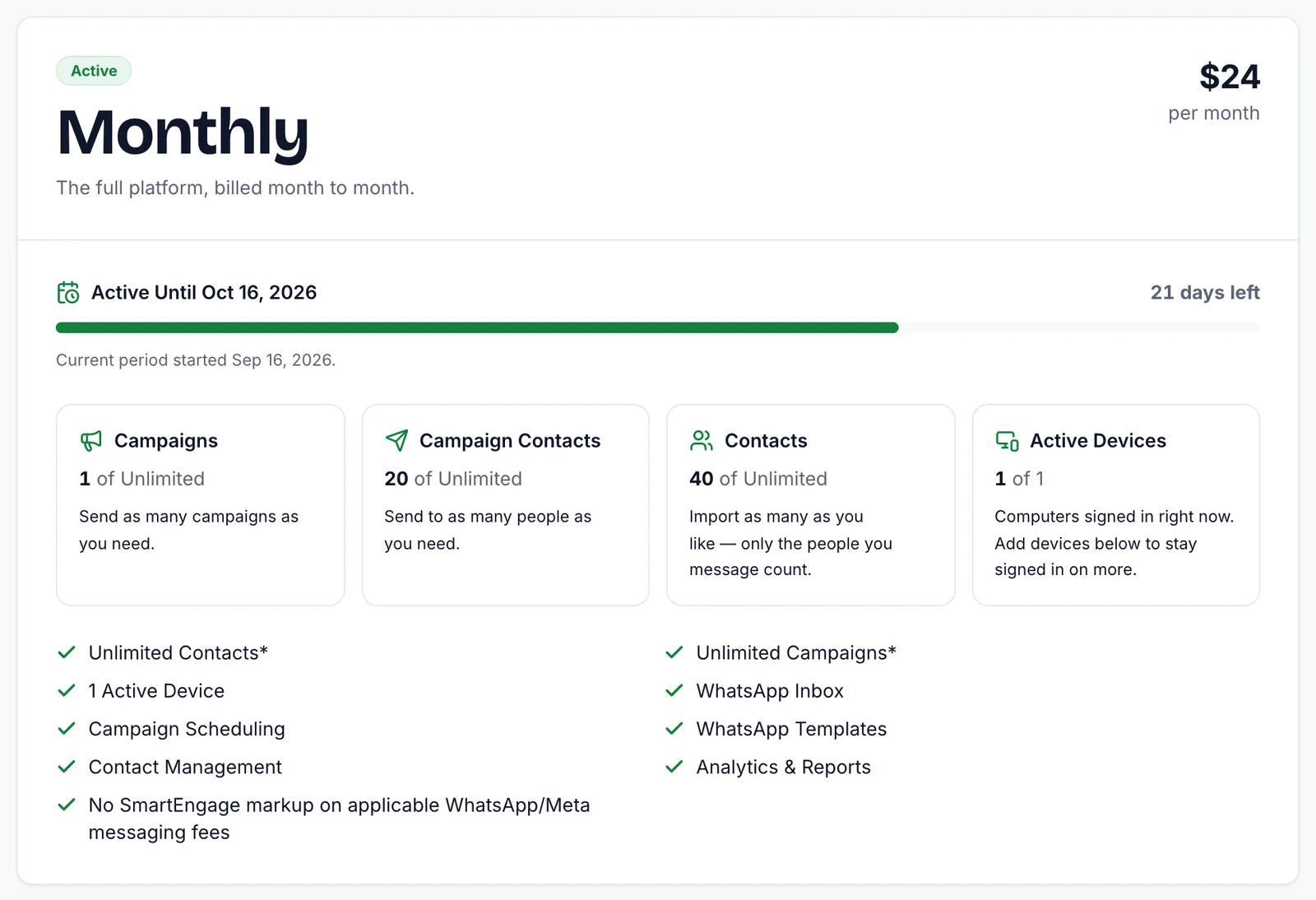
Below it, Choose Your Plan is where you pay, renew, upgrade or add devices, and Payment History lists every payment with its invoice.
When a Plan Ends
If a trial or paid plan ends without a new payment, the account becomes read-only. Nothing is deleted: your contacts, templates and campaigns all stay where they are. You simply cannot send until you choose a plan and pay, at which point everything works again.
Next Steps
Ready to pay? Follow How to Buy, Upgrade or Extend Your Plan.
For the reasoning behind our pricing, see Why We Add Zero Markup to Your Official WhatsApp Charges.
Ready to send safely?
Start free — no new number, no setup fee, no card required.
Keep Reading
 Account & WhatsApp Setup5 min read
Coexistence or API-Only: Choosing How to Connect Your Number
There are two ways to connect a WhatsApp number to SmartEngage. One keeps the WhatsApp Business app working; the other ends the number's life in the app for good. Here is how to choose.
Read article Contacts6 min read
Duplicates, Invalid Numbers and Opt-outs Explained
Why some rows in a SmartEngage import are skipped or refused, how duplicates are detected, what makes a number invalid, and what opting out actually does.
Read article Contacts6 min read
How Contacts and Contact Books Work in SmartEngage
What a contact holds, what a contact book is, and how the people you keep in SmartEngage become the audience for a WhatsApp campaign.
Read article