
Reading Your WhatsApp Campaign Analytics: What Actually Matters
Sending a WhatsApp campaign is only the beginning. Once your messages are out, the real question is whether the campaign achieved what you sent it for.
SmartEngage
It is tempting to look at the number of messages sent and call a big campaign a successful one. But volume alone does not tell you whether customers were interested, whether they talked to you, or whether the campaign made any sales.
The right figures, read in the right order, tell you what worked and what to change next time. Some of them SmartEngage reports for you. Others, such as sales, you track yourself, and it is worth being clear about which is which.
Why WhatsApp Campaign Analytics Matter
Imagine you send an offer to 10,000 customers and thousands of messages are delivered. Did anyone reply? Did they visit your website or buy? Did anyone ask you to stop?
Those answers are far more useful than the send count. Analytics move you from "We sent 10,000 messages" to "This offer brought in 40 orders from people who already buy from us".
1. Start With Your Campaign Objective
Before looking at any figures, decide what the campaign was meant to do. Different campaigns should be measured differently:
- Product launch: interest and enquiries.
- Discount campaign: sales.
- Lead generation: customers starting conversations.
- Customer notification: the information reaching people.
- Re-engagement: inactive customers coming back.
Without an objective, it is hard to say whether a campaign did well. A notification with no replies can be a complete success if its job was simply to inform.
2. Delivery Rate
Delivery rate is the share of sent messages that reached a phone. It is the first figure to check, because nothing else can happen until a message arrives. A strong delivery rate usually means your contact list is healthy.
If delivery is lower than expected, look at the reasons WhatsApp gave for the failures. The usual causes are:
- Numbers that are wrong or saved without the right country code
- Numbers that are not on WhatsApp
- A billing problem on your WhatsApp Business Account
- WhatsApp holding back marketing to people who already receive a lot of it
Sending more messages does not fix a delivery problem. A smaller list of people who opted in is worth more than a large one full of dead numbers.
Every campaign report groups failures by reason. See How to Read Your Campaign Results.
3. Read Rate and Engagement
A delivered message is not the same as an interested customer. Read rate, the share of delivered messages that were opened, is the first sign of engagement. Treat it as a minimum: WhatsApp only reports a read when the recipient has read receipts switched on, and many people turn them off.
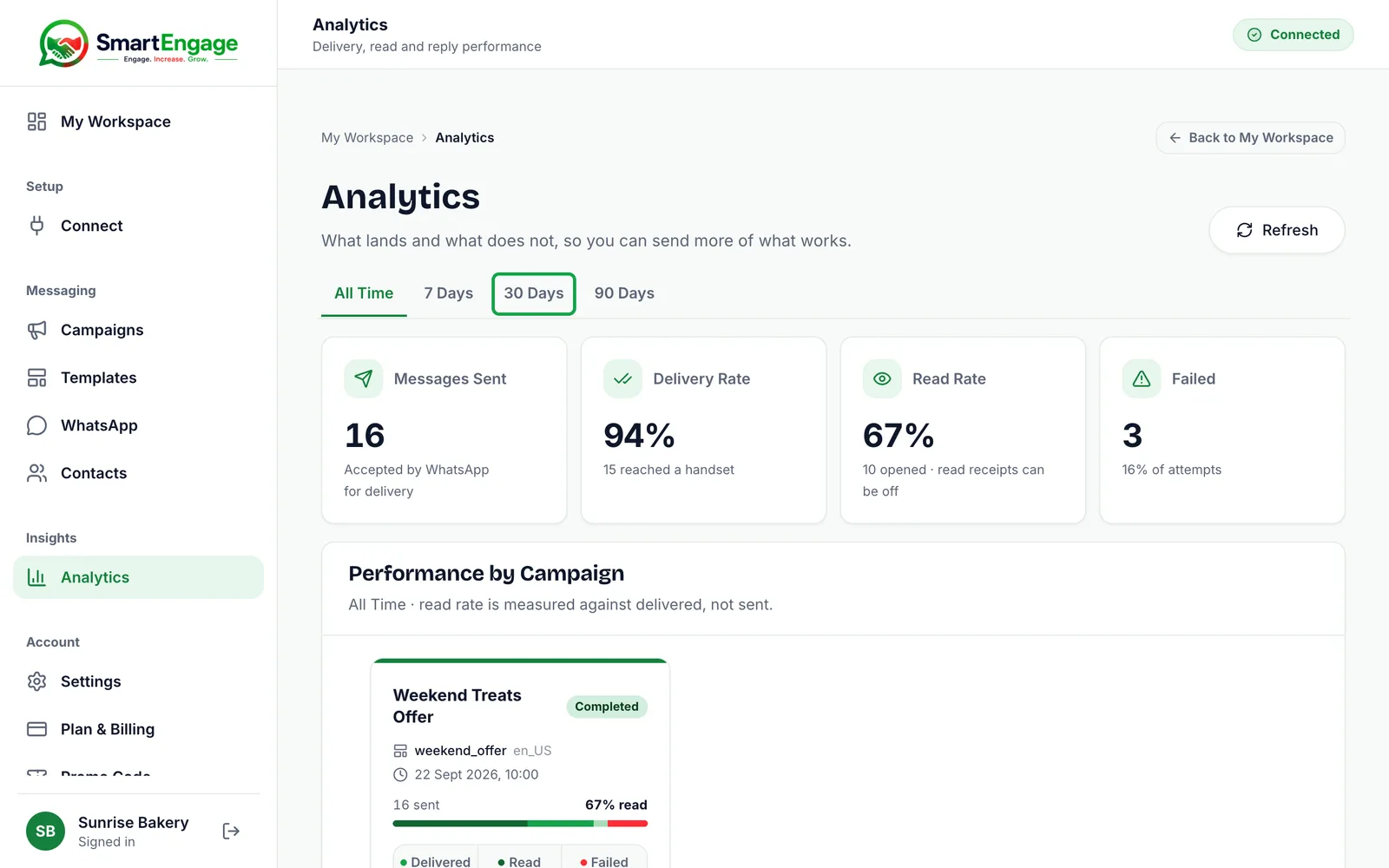
Beyond reading, useful signs of engagement include replies, enquiries, website visits and purchases. Suppose two campaigns both reach 5,000 customers. One brings 50 replies, the other 400. Their reach was the same, but the second tells you something about its content, audience or offer.
To see these rates for all your campaigns at once, read How to Use the Analytics Dashboard.
4. Response Rate
For conversational marketing, replies are often the most valuable signal. A reply means the customer took an active step rather than simply receiving your message. Replies to a campaign arrive in your SmartEngage inbox, where your team can answer them.
A high response rate suggests the offer is relevant, the message is clear and the call to action works. If it stays low, ask whether the message is too promotional, whether the offer is unclear, whether you are messaging the right people, and whether the customer has any reason to reply.
For how to turn those conversations into orders, read Turning WhatsApp Replies Into Sales.
5. Link Clicks
If your template includes a link to a website or product page, clicks show how many people were interested enough to find out more. SmartEngage does not count clicks, so measure them where they land: tag the link so your website analytics can tell visits from each campaign apart.
A low click count usually means the offer is not attractive enough, the message is not relevant to that audience, or the call to action is weak. "View the new collection and today's prices" gives people a clearer reason to tap than "Visit our website".
6. Conversion Rate Is Often the Most Important Figure
Clicks and replies are useful, but most businesses ultimately want results. A conversion could be a purchase, a booked appointment, an enquiry, a quotation request or a registration, depending on your business.
Suppose 1,000 customers receive your campaign, 100 visit the page, 20 enquire and 5 buy. That tells you far more than "1,000 messages were sent". Track conversions in your own shop or booking system, for example with a campaign-specific discount code, so you can tie each sale back to the campaign that prompted it.
7. Cost Per Result
Divide what a campaign cost by the results it produced. If a campaign cost 100 in Meta's message fees and brought in 20 qualified leads, each lead cost 5, in whatever currency you pay in. Compare that with the cost of a lead from search advertising, social media or email to see whether WhatsApp is earning its place.
Meta charges its message fees to your own WhatsApp Business Account, and SmartEngage adds no markup, so the figure you see in Meta's billing is the real cost of the messages.
8. Opt-Outs and Blocks Matter
Not every important signal is positive. Watch for opt-outs, negative replies and falling engagement. When a customer replies STOP or UNSUBSCRIBE, SmartEngage opts them out automatically, and the Audience step shows how many people in a book have opted out.
Blocks and spam reports are not shown to you directly, but Meta reflects them in your number's quality rating. A campaign with plenty of clicks is still a problem if many people ask not to hear from you again. If negative signals rise, you may be messaging too often, targeting the wrong people or sending content that is not relevant.
9. Compare Campaigns Over Time
One campaign does not tell the whole story. Figures become much more useful side by side. For example, three sends to similar audiences might look like this:
- New Product: 4,800 delivered, 180 replies, 35 sales
- Weekend Offer: 4,750 delivered, 240 replies, 62 sales
- Newsletter: 4,900 delivered, 75 replies, 12 sales
The Weekend Offer clearly did best. Work out why: a better offer, a better-chosen audience, clearer wording or a better time. Learn from successful campaigns rather than simply repeating them.
10. Compare Audiences, Not Just Totals
Overall figures can hide big differences between groups. New customers may behave differently from repeat buyers, and one town may respond better than another.
SmartEngage reports figures per campaign, so the simplest way to compare groups is to keep them in separate contact books and send each its own campaign. Then, instead of asking "Did our campaign work?", you can ask "Which group responded best?", which is a much more useful question.
11. Don’t Chase Vanity Metrics
Some numbers look impressive without meaning much. Fifty thousand messages sent sounds like a lot, but if few people engage and nobody buys, the campaign missed its objective. A smaller campaign that produces good leads is often worth more.
Reach is useful. Engagement is better. Conversions are usually what matter most.
12. Use Analytics to Improve Your Next Campaign
Do not look at the figures once and forget them. Before your next campaign, ask:
- Which message got the most replies?
- Which audience engaged most?
- Which offer produced the most sales?
- Which campaign led to the most opt-outs?
- Which time or day worked best?
- Which call to action worked best?
Then use the answers. Send, measure, learn, improve and send again, and over time your WhatsApp marketing becomes more targeted and more effective.
The Most Important Figures at a Glance
- Delivery: did your messages reach people? Reported by SmartEngage.
- Read rate: did they open them? Reported by SmartEngage, as a minimum.
- Failures: why did some not arrive? Grouped by reason in each campaign report.
- Replies: did customers start conversations? Visible in your inbox.
- Clicks and conversions: did the campaign produce the result you wanted? Tracked on your website or in your shop.
- Cost per result: how efficiently did it do so?
- Opt-outs and quality rating: are customers telling you to change your approach?
Read together, these give a much clearer picture than any single number.
Final Thoughts
Do not judge a campaign only by how many messages went out. Look at what happened after people received them: did they read, reply, click or buy, and did they stay happy to hear from you?
The strongest WhatsApp marketing is built on relevant audiences, useful content, responsible sending and steady improvement. Paying attention to the figures that matter is how you get there.
Ready to send safely?
Start free — no new number, no setup fee, no card required.
Keep Reading
 Account & WhatsApp Setup5 min read
Coexistence or API-Only: Choosing How to Connect Your Number
There are two ways to connect a WhatsApp number to SmartEngage. One keeps the WhatsApp Business app working; the other ends the number's life in the app for good. Here is how to choose.
Read article Contacts6 min read
Duplicates, Invalid Numbers and Opt-outs Explained
Why some rows in a SmartEngage import are skipped or refused, how duplicates are detected, what makes a number invalid, and what opting out actually does.
Read article Contacts6 min read
How Contacts and Contact Books Work in SmartEngage
What a contact holds, what a contact book is, and how the people you keep in SmartEngage become the audience for a WhatsApp campaign.
Read article