
Turning WhatsApp Replies Into Sales
Getting a customer to reply to a WhatsApp message is a valuable opportunity. It means your message has captured their attention enough for them to start a conversation. But a reply alone isn't a sale. The real challenge for businesses is knowing what to do next.
SmartEngage
When a customer responds by asking about pricing, requesting more information, checking product availability, or simply saying hello, that interaction can open the door to a valuable sales opportunity. If businesses respond slowly, send irrelevant information, or immediately push for a purchase, the opportunity can disappear.
Successful WhatsApp sales are less about sending more messages and more about having better conversations. With the right approach, businesses can use WhatsApp to answer questions, understand customer needs, overcome objections, recommend products, and guide interested customers toward a purchase.
Why WhatsApp Replies Are Valuable for Sales
Traditional advertising usually works one way: the business places an advert and the customer sees it. WhatsApp can create a different journey:
- Advertising: Business → Advert → Customer
- WhatsApp: Business → Message → Customer reply → Conversation → Purchase
When a customer replies, you have an opportunity to understand what they actually want. For example, imagine a clothing business sends: "Our new winter collection has arrived. Reply 'CATALOGUE' to see the latest styles."
A customer replies: "CATALOGUE". That customer has shown interest. Instead of treating the reply as just another message, the business can continue the conversation by sharing relevant information and asking a useful follow-up question. This is where WhatsApp moves from being a marketing channel to becoming a sales conversation channel.
1. Respond Quickly
Speed matters when a customer is actively interested. If someone asks: "How much is this?" and receives a response several hours later, they may already have bought elsewhere or lost interest. A quick response doesn't necessarily mean sending a long sales pitch. Often, a short and helpful answer is better. For example:
- Customer: "What is the price?"
- Business: "Hi, this model is R499. It comes in black, white and blue. Would you like me to send the options?"
The response answers the question and naturally keeps the conversation moving.
Speed also matters for a WhatsApp-specific reason. When a customer messages you, a 24-hour reply window opens, and inside it you can answer in your own words. Once it closes, your first message back has to be an approved template, which is a much clumsier way to continue a sales conversation.
To see how the window works, read The 24-Hour Reply Window Explained.
2. Don't Treat Every Reply the Same
Not every customer who responds has the same level of buying intent. Consider these examples:
- Low intent: "Nice."
- Curious: "Can you tell me more?"
- Interested: "How much does it cost?"
- High intent: "Can I order two?"
Each response requires a different approach. Businesses should avoid sending the same automated answer to everyone. Instead, sort conversations based on what the customer is trying to achieve. Useful categories might include:
- New inquiry
- Product information
- Pricing request
- Stock availability
- Delivery question
- Existing customer
- Ready to purchase
- Follow-up required
This makes it easier to prioritise conversations. In SmartEngage, replies arrive in a shared inbox where you can star the conversations that need follow-up and add tags such as "ready to order" or "wholesale" in the customer details panel, so everyone on the team can see where each customer stands.
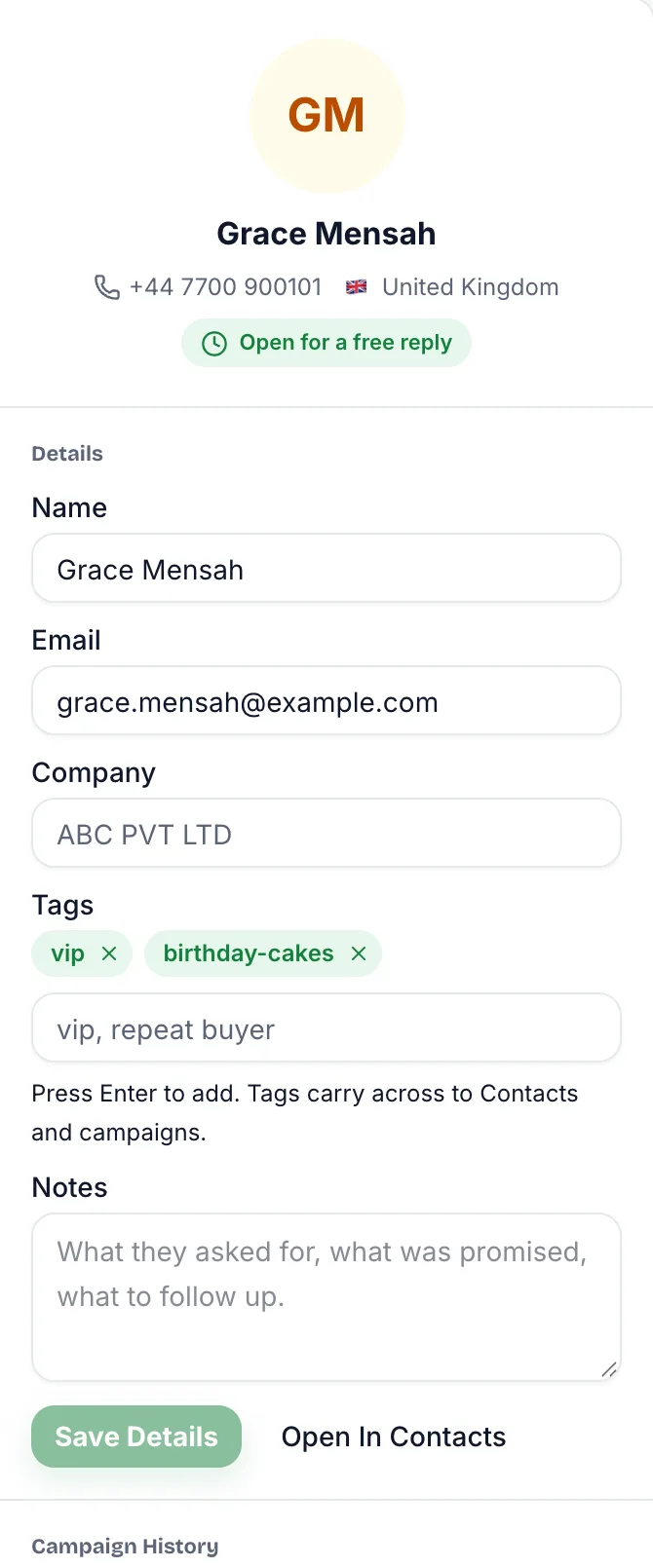
To set this up with colleagues, see How to Organise Conversations with Your Team.
3. Ask the Right Questions
One of the most powerful WhatsApp sales techniques is asking useful questions. But there is a difference between asking questions and interrogating customers. Bad approach: "What is your name? What product do you need? What quantity? What is your budget? Where do you live?" The customer may feel like they are filling out a form. A better approach is conversational.
- Customer: "I need a bulk order."
- Business: "Sure. What product are you looking for, and approximately how much do you need?"
Once the customer answers, you can ask the next relevant question. The goal is to understand the customer's requirement without creating unnecessary friction.
4. Focus on the Customer's Problem
Customers don't always buy because a product has a long list of features. They buy because the product solves a problem, meets a need, saves time, adds convenience or provides another form of value. Suppose someone asks about a business software product. Instead of immediately listing 20 features, ask: "What are you currently using to manage your sales?" Their answer can reveal the problem. If they say:
"We manage everything in spreadsheets, and it takes too much time." You now know what matters to them. Your conversation can focus on:
- Saving time
- Reducing manual work
- Improving organisation
- Tracking sales
- Simplifying reporting
The more closely your response matches the customer's actual need, the more meaningful the conversation becomes.
5. Give Information in Small Steps
One common mistake in WhatsApp sales is sending huge blocks of information. Imagine a customer asks: "What products do you have?" The business responds with a huge catalogue containing dozens of products, prices, descriptions, policies, and company information. The customer may simply stop reading. Instead, start with the most relevant information. For example:
"We supply spices, herbal powders, and seeds in bulk. Are you looking for spices, herbs, or seeds?" Once the customer chooses a category, provide the relevant products. This creates a conversation rather than an information dump.
6. Handle Price Questions Properly
Price is one of the most common questions businesses receive on WhatsApp. Some businesses avoid answering directly because they want to explain the product first. That can frustrate customers. If the price is available, provide it clearly. Then add useful context. For example: "The current price is R250 per unit. We also offer bulk pricing for larger quantities. How many units are you looking for?"
Now the price conversation becomes an opportunity to identify a larger sales requirement. For B2B businesses, this can be particularly useful because quantity often affects pricing.
7. Use Clear Calls to Action
A WhatsApp conversation should have a logical next step. Instead of ending with: "Let me know if you need anything." Give the customer a simple action. Examples include:
- "Would you like the full catalogue?"
- "Should I check availability for you?"
- "Would you like delivery options?"
- "How many units do you need?"
- "Would you like to place the order?"
- "Can I send you a quotation?"
A good CTA doesn't pressure the customer. It simply makes the next step obvious.
8. Make Product Recommendations Relevant
If a customer has shown interest in one product, you can recommend related products when there is a genuine reason. For example: A customer asks about turmeric powder. Instead of promoting ten unrelated products, you might say: "If you're buying turmeric powder for food manufacturing, we also supply other commonly used spice ingredients in bulk. Would you like to see the related options?"
This is more useful than sending a generic promotional catalogue. Relevant recommendations can increase the value of each conversation while keeping the customer experience focused.
9. Overcome Objections Instead of Avoiding Them
Customers often hesitate before purchasing. Common objections include:
- "It's too expensive."
- "I need to think about it."
- "I found a cheaper option."
- "Can you deliver?"
- "I need to speak with my partner."
- "Do you have a warranty?"
- "Is this available in bulk?"
Don't treat objections as rejection. They are often signals that the customer needs more information. For example: Customer: "Your price is higher than another supplier." Instead of immediately offering a discount, ask: "I understand. Are you comparing the same quantity and specifications? I can help you compare the options." This allows you to explain value without immediately reducing your price.
10. Know When to Move From Chat to Checkout
WhatsApp is excellent for conversations, but the final transaction may happen elsewhere. Based on your business model and the customer's needs, the conversation may naturally move toward one of these next steps:
- Website checkout
- Payment page
- Quotation
- Booking form
- Sales representative
- Phone call
- Physical store
- Invoice
When the customer is ready, make the transition simple. For example: "Great. I can prepare the order for you. Would you like me to share the payment link so you can complete your order?" The customer shouldn't have to search through your website to figure out what to do next.
11. Follow Up Without Becoming Annoying
Not every interested customer buys immediately. Some need time. For example, on day 1 a customer asks for pricing, and by day 2 they still have not replied. A reasonable follow-up could be: "Hi, just checking whether you had a chance to review the quotation. I'm happy to answer any questions." The follow-up should give the customer a chance to continue the conversation, not repeat your promotion.
Keep the reply window in mind. If more than 24 hours have passed since the customer's last message, the follow-up has to be an approved template rather than a free-form message, so it is worth having a short, polite follow-up template ready.
If the customer clearly does not want further messages, respect that. A customer who replies STOP or UNSUBSCRIBE is opted out automatically in SmartEngage and left out of future campaigns.
12. Track Conversations and Sales
If you want to improve WhatsApp sales, you need to know what happens after the reply. Important metrics can include:
- Number of customer replies
- Response time
- Qualified leads
- Conversations started
- Quotations requested
- Orders generated
- Conversion rate
- Revenue generated
- Follow-up completion
- Opt-outs or blocks
For example, suppose 1,000 people receive a campaign. You might find something like: 1,000 messages → 120 replies → 40 qualified leads → 15 sales. The figures are only an illustration, but a funnel like this is far more useful than knowing that the messages were delivered. It shows where the sales process is working and where it needs improvement.
SmartEngage's campaign report shows how many messages were sent, delivered, read and failed, and each customer's details panel shows which campaigns they received. Replies arrive in the inbox. Leads, orders and revenue are yours to record in whatever sales system you already use.
For a tour of the report, see How to Read Your Campaign Results.
13. Automate Repetitive Tasks, Not the Entire Relationship
If you use automation, keep it for the repetitive parts of the conversation, particularly when you receive many enquiries. Typical examples are:
- Initial greetings
- Frequently asked questions
- Product categories
- Business hours
- Basic information
- Lead collection
- Follow-up reminders
But automation should not make every conversation feel robotic. When a customer has a specific question or a high-value requirement, a person needs to take over. The ideal approach is usually automation for speed and people for the conversations that decide the sale.
How SmartEngage Can Help Turn Replies Into Sales
A successful WhatsApp campaign should not end when customers respond. The aim is to connect marketing with sales: reach customers, generate interest, start conversations, understand needs, follow up and convert.
SmartEngage is built around that handover. Campaign replies arrive in one inbox that your whole team shares. Each conversation shows the customer's details, notes and tags, and which of your campaigns they received and read, so whoever answers knows the context. When a business has a clear process for handling responses, a WhatsApp campaign becomes much more valuable than a simple promotional broadcast.
To see how the inbox fits together, read How the SmartEngage Inbox Works.
Common Mistakes That Can Cost You Sales
Even businesses that receive plenty of WhatsApp replies can lose potential customers through poor follow-up. Avoid these common mistakes:
- Taking too long to respond: interested customers move on.
- Sending generic answers: customers want replies that match their question.
- Overloading customers with information: too much at once creates confusion.
- Pushing for a sale too early: build understanding before asking for the order.
- Ignoring objections: a concern is often a chance to give useful information.
- Failing to follow up: some customers need more time before deciding.
- Sending too many promotions: frequent messages wear down trust.
Final Thoughts
Turning WhatsApp replies into sales requires more than sending promotional messages. The real opportunity begins when the customer responds. Businesses should respond promptly, understand customer needs, ask useful questions, provide relevant information, address objections, and make the next step simple.
Most importantly, do not think of WhatsApp as just a broadcasting tool. Think of it as a channel where marketing starts the conversation and sales continues it. With the right messaging, sensible segmentation, a follow-up process and measurement, WhatsApp replies can become qualified leads, meaningful conversations and, eventually, sales.
The goal is not simply to send more messages. It is to create better customer conversations that move interested people closer to buying.
Ready to send safely?
Start free — no new number, no setup fee, no card required.
Keep Reading
 Account & WhatsApp Setup5 min read
Coexistence or API-Only: Choosing How to Connect Your Number
There are two ways to connect a WhatsApp number to SmartEngage. One keeps the WhatsApp Business app working; the other ends the number's life in the app for good. Here is how to choose.
Read article Contacts6 min read
Duplicates, Invalid Numbers and Opt-outs Explained
Why some rows in a SmartEngage import are skipped or refused, how duplicates are detected, what makes a number invalid, and what opting out actually does.
Read article Contacts6 min read
How Contacts and Contact Books Work in SmartEngage
What a contact holds, what a contact book is, and how the people you keep in SmartEngage become the audience for a WhatsApp campaign.
Read article