WhatsApp Message Templates Explained: Categories, Approval and Cost
A message template is wording Meta has approved for a business to send on WhatsApp. Its category decides the rules it is reviewed against and the rate Meta charges for it. This article explains the three categories, how approval works and how the costs fit together.
SmartEngage
Whether you run an online shop, a restaurant, a clinic or a B2B service, most of the WhatsApp messages you send to start a conversation will be templates. Knowing how they are categorised, approved and priced helps you write templates that are approved first time and budget for them properly.
What Is a WhatsApp Message Template?
A template is a message you write once, submit to Meta for approval and then reuse. It can contain numbered placeholders for the details that change from customer to customer, for example: "Hi {{1}}, your order {{2}} is on its way and should reach you by {{3}}."
When the message is sent, each placeholder is filled in for that customer: {{1}} with their name, {{2}} with the order number and {{3}} with the delivery date. Every recipient gets a personal message, while the wording Meta approved stays the same.
Why Templates Matter
WhatsApp lets a business reply freely for 24 hours after a customer's last message. Outside that window, the first message must be an approved template. That covers every campaign and every conversation you start yourself.
For the detail, read The 24-Hour Reply Window Explained.
Templates also keep your messages consistent. Instead of each person on your team writing the same notification differently, you have one approved wording to reuse.
The Three Template Categories
Meta sorts every template into one of three categories: marketing, utility and authentication. The category decides the rules the template is reviewed against and the rate Meta charges when it is delivered.
Marketing Templates
Marketing templates promote something: an offer, a product, an event or a reason to come back. Typical uses include:
- Sales and discount announcements
- New products and seasonal ranges
- Event invitations
- Product recommendations
- Messages to win back customers who have gone quiet
For example: "Hi {{1}}, our weekend sale is now live, with selected products reduced until {{2}}."
Send marketing templates only to people who have opted in, and give them an easy way out, such as "Reply STOP to opt out" in the footer. Not every message needs to sell; customers who only ever hear offers soon stop reading.
Utility Templates
Utility templates are about something the customer has already done or asked for: a purchase, a booking, a payment or an account. Typical uses include:
- Order confirmations and delivery updates
- Appointment and booking reminders
- Payment receipts
- Account updates
For example: "Hi {{1}}, your booking is confirmed for {{2}} at {{3}}."
A utility template must stay about that transaction. Adding a promotion to it, or submitting a promotional message as utility, is one of the most common reasons Meta rejects a template.
Authentication Templates
Authentication templates deliver one-time passcodes that confirm a customer's identity, such as: "Your verification code is {{1}}. Do not share this code with anyone."
Meta controls the wording of these itself. A business chooses from Meta's options rather than writing its own text, and cannot add promotional content.
Which Templates You Can Create in SmartEngage
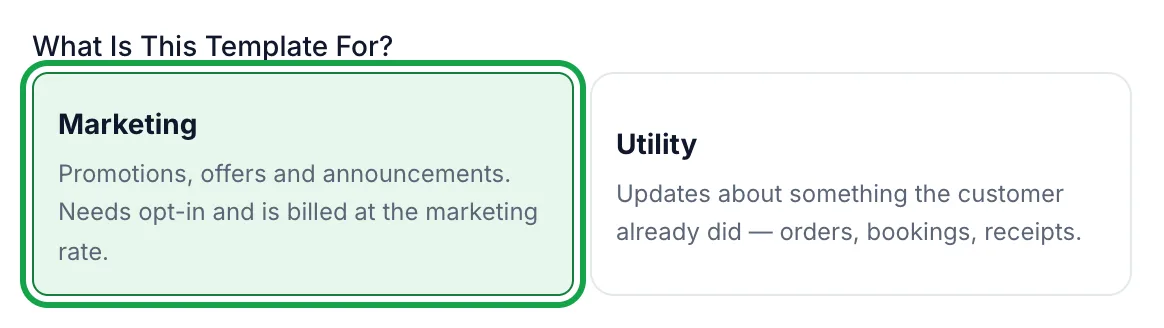
The SmartEngage template composer asks what the template is for and offers Marketing or Utility. If you need an authentication template, create it in Meta's WhatsApp Manager, then press Refresh on the Templates page to bring it into SmartEngage.
For a step-by-step walkthrough, follow How to Create a Message Template.
How Template Approval Works
Every template is reviewed by Meta before it can be sent. Most are answered within minutes, and occasionally a review takes up to 24 hours. Reviewers do not just check the spelling: they check that the category matches the content and that the message follows WhatsApp's policies.
Before you submit, make sure that:
- The purpose is clear from the message alone
- The category honestly matches the content
- Every placeholder has a realistic example value
- The message does not start or end with a placeholder
- Nothing in it is misleading or prohibited by WhatsApp's policies
SmartEngage checks Meta's formatting rules as you write, so problems such as a missing example are caught before anything is sent to Meta.
Why Templates Get Rejected
Most rejections come down to a few causes: a promotion submitted as utility, vague wording, or placeholders without clear examples. A good test is whether the message answers four questions on its own: who is writing, why, what the customer should do next and what they need to know to do it.
If a template comes back declined, read Why Templates Get Rejected and How to Fix Them.
What a WhatsApp Message Costs
Meta charges for template messages, and the rate depends on the template's category and the country of the person receiving it. The same campaign sent to customers in South Africa and in Nigeria can cost a different amount per message.
Meta has changed its pricing several times, so check its current rates for the countries you send to before planning a campaign budget, especially for high-volume marketing.
Meta's Charges and Your SmartEngage Plan
Two costs are involved, and they are separate. Meta bills its message charges separately, and SmartEngage adds no markup to them. Your SmartEngage plan is a separate subscription for the software you use to manage contacts, campaigns and conversations. Taxes may apply to either.
For why we work this way, read Why We Add Zero Markup to Your Official WhatsApp Charges.
For plan details, see our pricing page.
How to Write Better Templates
- Keep to one purpose. One offer per template, not five.
- Make the value clear. Say why the message matters to the person reading it.
- Personalise where it helps. A name or an order number makes a message feel expected.
- End with a clear next step. Tell the customer exactly what to do: reply, visit a page or call.
- Choose the honest category. Picking one because you think it is cheaper or easier to approve usually ends in a rejection.
- Read it as your customer would. If you would not know why the business wrote or what to do next, rewrite it.
Final Thoughts
Good templates are short, honest about their purpose and filed under the right category. Get those right and approval is usually quick, costs are predictable and customers are glad to hear from you.
Successful WhatsApp marketing is not about sending the most messages. It is about sending the right message to the right customer at the right time.
Ready to send safely?
Start free — no new number, no setup fee, no card required.
Keep Reading
 Account & WhatsApp Setup5 min read
Coexistence or API-Only: Choosing How to Connect Your Number
There are two ways to connect a WhatsApp number to SmartEngage. One keeps the WhatsApp Business app working; the other ends the number's life in the app for good. Here is how to choose.
Read article Contacts6 min read
Duplicates, Invalid Numbers and Opt-outs Explained
Why some rows in a SmartEngage import are skipped or refused, how duplicates are detected, what makes a number invalid, and what opting out actually does.
Read article Contacts6 min read
How Contacts and Contact Books Work in SmartEngage
What a contact holds, what a contact book is, and how the people you keep in SmartEngage become the audience for a WhatsApp campaign.
Read article